Brool brool (n.) : a low roar; a deep murmur or humming
Using Markdown with Mutt
This took me a while to figure out, so in the hopes that I can save someone some time, here’s how to use markdown with Mutt:
Step 1: Install msmtp (or any other program)
On OS X you can do this with “brew install msmtp”. (You can use sendmail or whatever, but msmtp was easy to set up.).
Step 2: Set up msmtp
Set up the appropriate configuration file. I ran into a problem wherein the program would just hang; turning on debug showed that it hung after “Reading recipients from command line.” This turned out to be an incorrect SSL configuration – I needed tls_starttls to be off.
My particular .msmtprc configuration:
defaults tls on tls_starttls off tls_certcheck off account Work host mail.host.com domain domain.com auth on port 465 protocol smtp from from-name user user-name password passwordStep 3: install sendmail replacement
For me, this was two things: a small shell script and a Python program that will convert any plaintext e-mail into a plaintext + HTML e-mail.
Shell script mark_send:
#!/bin/sh /Users/tim/mutt/mark_and_send.py "/usr/local/bin/pandoc -s" | /usr/local/bin/msmtp -a Work $@Python script mark_and_send.py:
#!/usr/bin/python import os import sys import subprocess import email import email.parser import tempfile from email.mime.multipart import MIMEMultipart from email.mime.text import MIMEText if len(sys.argv) == 1: print "usage: mark_and_send.py markdown_program [markdown_flag]" print "where:" print " markdown_program is the name of the program to translate markdown." print " markdown_flag is an optional indicator in the first line that determines whether to run the markdown program" sys.exit(0) markdown_program = sys.argv[1] p = email.parser.Parser() m = p.parsestr(sys.stdin.read()) # is this a single header? do_markdown = False if not m.is_multipart() and m.get_content_maintype() == 'text' and m.get_content_subtype() == 'plain': do_markdown = True payload = m.get_payload() # optionally check the markdown flag if len(sys.argv) == 3: lines = payload.split("\n") do_markdown = lines[0] == sys.argv[2] if do_markdown: payload = "\n".join(lines[1:]) if do_markdown: tf = tempfile.NamedTemporaryFile(delete=False) tf.write(payload) tf.close() (markdown, error) = subprocess.Popen(markdown_program.split() + [tf.name], stdout=subprocess.PIPE).communicate() # create a new message with the exact same headers new_message = MIMEMultipart('alternative') for (k,v) in m._headers: new_message[k] = v text_plain = MIMEText(payload, 'plain') new_message.attach(text_plain) text_html = MIMEText(markdown, 'html') new_message.attach(text_html) print new_message.as_string() os.unlink(tf.name) else: print m.as_string()The mark_and_send.py program takes one required argument (the name of the program to convert from markdown to HTML, possibly quoted) an an optional indicator of markdown. If the first line of the message is the indicator, then it is stripped and the rest of the message is converted to HTML.
Step 3: set up mutt
You need to tell mutt to use your shell script instead of sendmail. I have it inside a folder hook:
folder-hook +work/.* 'set sendmail="/bin/sh /Users/tim/mutt/mark_send"'Now, whenever you send a plain-text email, mutt will automatically run markdown on it and attach it as the HTML view of the message.
Results
So, after running with this for a few days, here are my impressions:
- Markdown is not ideal for e-mail, at least, not without some work. For example: more e-mails that are quoted by default will not work properly in markdown, because there are not blank lines in the message to set off the blockquote. This could possibly be improved by post-processing the file that Mutt generates on a reply, but I don’t think there’s a hook for that.
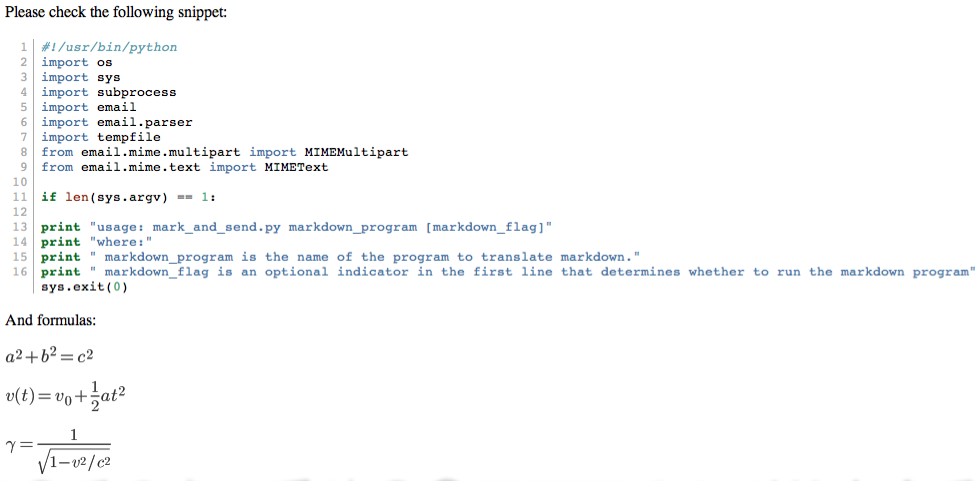
- Code coloring is nice
- Math formulas, if you need them
Example is show below, as rendered by Zimbra. It isn’t perfect. Google will unfortunately strip the colors from the code coloring, and Zimbra loses leading indents, and both readers will require the user to load images. Nonetheless, in a pinch…
Discussion
Comments are moderated whenever I remember that I have a blog.

